Éclair 1.2.0: the AI assistant writes, you publish
 By Thierry Gustin
Published
6 min read
By Thierry Gustin
Published
6 min read
Contents
- What does Éclair’s AI assistant do?
- How does the AI assistant write in your site’s voice?
- Can the AI publish for me?
- How much does the AI assistant cost?
- Are my API keys safe?
- What else is new in Éclair 1.2.0?
- What was in versions 1.0.0 and 1.1.0?
- How do you update to Éclair 1.2.0?
- What comes next?
- Frequently asked questions about the AI assistant
Éclair 1.2.0 has been available since October 29, 2026. The big news: an AI assistant built into the admin that writes, illustrates and edits your content in your site’s voice. It prepares everything; you review and publish. Here’s what changes, what it really costs and how to update your site in five minutes.
What does Éclair’s AI assistant do?
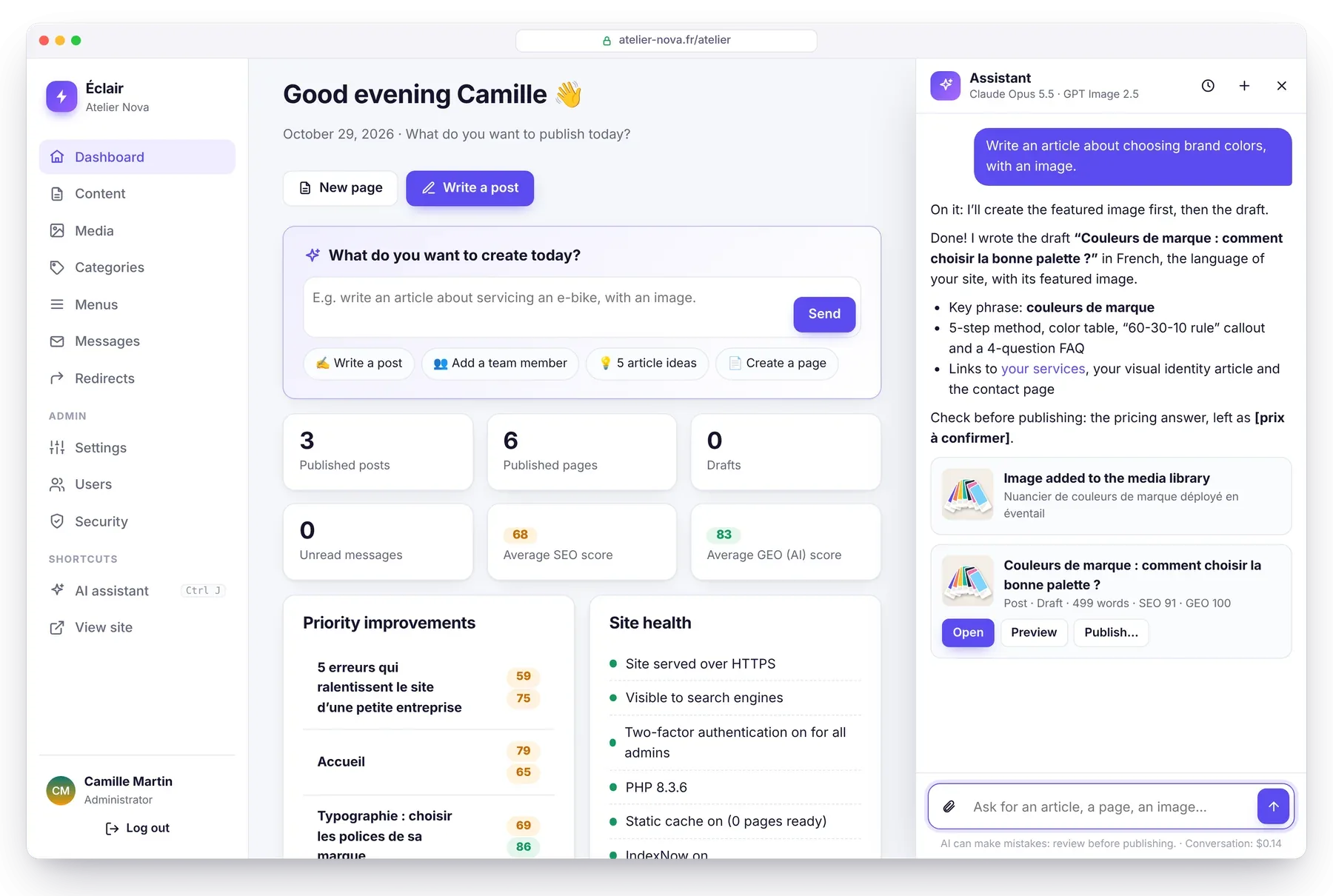
You talk to it as you would to a colleague, from the dashboard (“What do you want to create today?”) or with the Ctrl+J shortcut. For example: “Write an article about servicing an e-bike in spring, with an image.”
The assistant then works through the steps a good web writer would follow:
- it checks that the topic isn’t already covered on your site, to avoid duplicates
- it creates the featured image, optimizes it as WebP and writes its alt text
- it writes a complete draft: title, “Key takeaways” summary, subheadings, table, FAQ, meta description and internal links
- it presents the draft with its SEO and GEO scores, calculated by the same analysis as the editor
It can also work on existing content: “Add Léa Martin to the team page with the attached photo”, “Review my home page and suggest improvements”, “Give me 5 article ideas to attract new customers”.
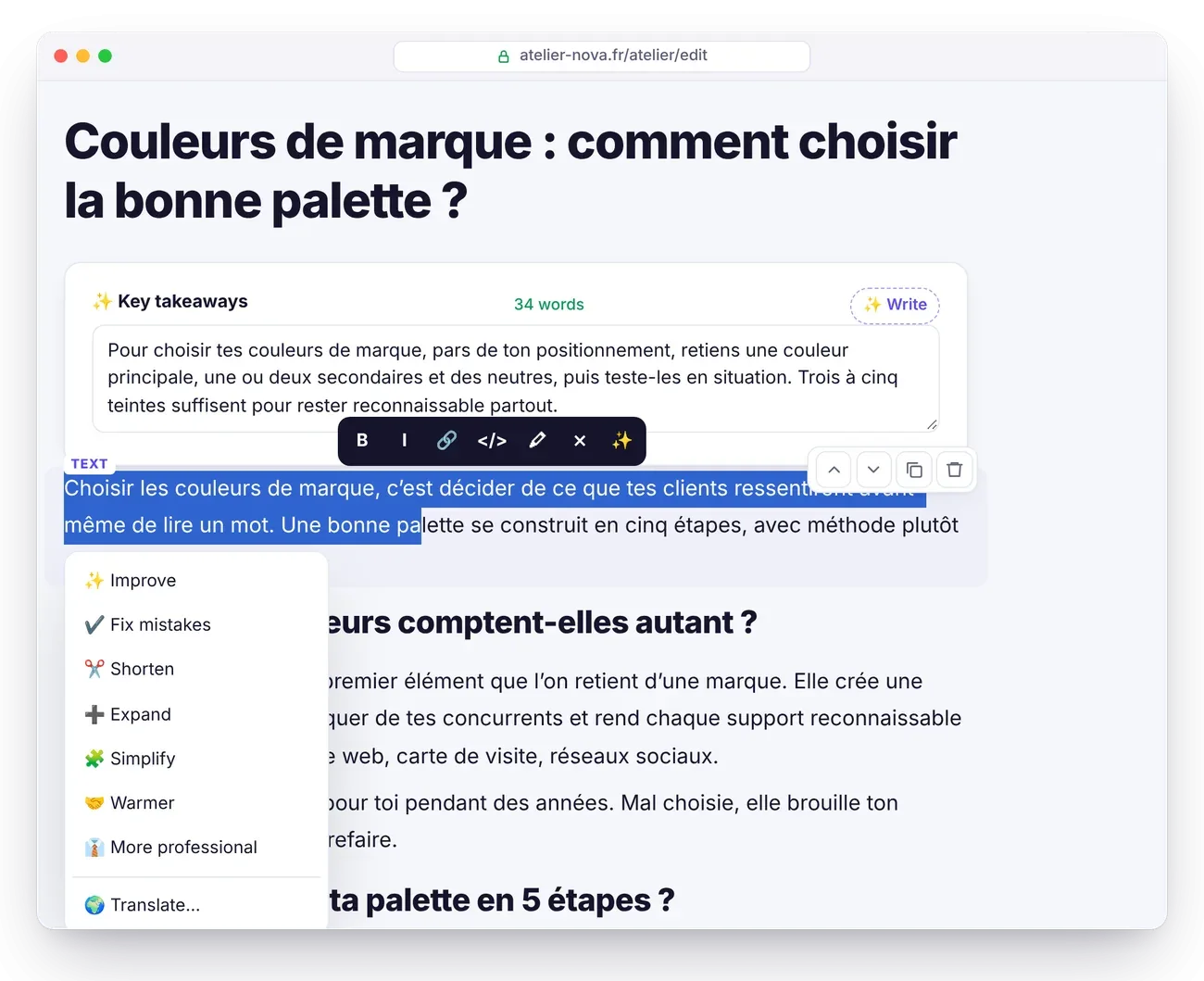
In the editor, select a passage, then click ✨: improve, fix mistakes, shorten, expand, simplify, make it warmer or more professional, translate. The SEO and Analysis tabs have their own buttons: title ideas, meta description, FAQ, missing alt texts.
How does the AI assistant write in your site’s voice?
Thanks to the editorial profile, drafted in one click from your pages and posts: who you are, who you’re writing for, tone and style (formal or casual, sentence length, humor), values, rules to follow (“always link to the contact page”, “never mention prices”) and image style. You review it, adjust it and keep the final say.
On top of that, the assistant follows Éclair’s analysis rules: its drafts aim for a high score right from the start. And it never makes up facts about your business: when information is missing (prices, opening hours, figures, testimonials), it leaves a visible placeholder such as [price to confirm] and points it out to you.
Can the AI publish for me?
No, and that’s the principle behind this entire release: the AI prepares, you decide. It can search and read your content, create drafts, edit a draft, suggest a change to published content and create images. It cannot publish, delete, or touch the settings, menus or accounts.
Every action produces a card below the reply:
| Card | What happened | Your buttons |
|---|---|---|
| 📝 Draft | New post or new page, never published | Open, Preview, Publish now or schedule |
| ✏️ Suggested change | Published content: nothing changes until you approve | Preview, Apply, Dismiss |
| ✅ Updated | A draft changed directly | Open, Preview, Cancel |
| 🖼️ Image | Image created, optimized and added to the media library | Featured image |
“Cancel” remains available as long as nobody has edited the content since; otherwise, the editor’s Version history, which keeps the last 20 versions, takes over. The assistant’s history keeps your last 30 conversations.
How much does the AI assistant cost?
There’s no Éclair subscription: you use your own API key and pay the provider for what you actually use. Éclair calculates every expense from the billed tokens and shows it in Settings › AI assistant. Here’s the estimate for a full post, about 25,000 input tokens and 7,000 output tokens, searches and checks included:
| Model | Price per million tokens (input / output) | Full post |
|---|---|---|
| Claude Opus 5.5 (the most capable) | $4 / $20 | ≈ $0.24 |
| Claude Sonnet 5.5 | $2 / $10 | ≈ $0.12 |
| Claude Haiku 5.5 | $0.10 / $0.50 | < $0.01 |
| GPT-6 Astra | $10 / $50 | ≈ $0.60 |
| GPT-6.1 Sol | $2 / $10 | ≈ $0.12 |
| GPT-6.1 Terra | $1 / $5 | ≈ $0.06 |
| GPT-6 Luna | $0.10 / $0.50 | < $0.01 |
An image costs about $0.05 (FLUX 3 at 1 megapixel: $0.048). Public prices from the official pages of Anthropic, OpenAI and Black Forest Labs, as of October 29, 2026; they may change.
Safeguards protect you from unpleasant surprises: a monthly budget ($10 by default), checked before each step of a request, a quota of 60 requests per person per day, and no more than two requests at a time per person.
Are my API keys safe?
Yes. Keys are encrypted on your server (libsodium, or AES-256-GCM), never sent to the browser and never displayed: only a hint like “sk-ant…ab12” appears. They’re excluded from backups, as is the conversation history.
Like the rest of Éclair, the assistant got its own security review before release:
- the budget is recounted at every step, and a request stops after 7 minutes
- “Cancel” is refused if someone has changed the content in the meantime
- edits only touch the visible text, never a link’s URL
- generated images are downloaded over HTTPS from a verified public address, then re-encoded just like an upload
- suggestions left unhandled expire after 14 days
- content the AI reads is treated as data, never as instructions
What else is new in Éclair 1.2.0?
- A new Team block: round portraits (or initials), job titles, short bios and profile links.
- The assistant translated into 6 languages, with 203 new interface strings.
- Compressed language files: Éclair stays under 1 MB once unzipped.
- 299 automated checks, including fake AI providers to test the assistant with no key and no spending.
- A 402 KB archive, compared with more than 35 MB for WordPress 7.1.4 (as of October 30, 2026).
What was in versions 1.0.0 and 1.1.0?
All three versions came out on the same day, October 29, 2026:
- 1.0.0 lays the foundations: a CMS with no database, a static cache, built-in SEO and GEO, security hardened by an offensive review (17 vulnerabilities found and fixed), a block editor and installation in 4 questions.
- 1.1.0 translates the admin into 7 languages (French, English, Spanish, German, Italian, Portuguese and Chinese), with 817 strings per language.
- 1.2.0 adds the AI assistant, the Team block and the assistant’s translations.
Each version is detailed in the changelog.
How do you update to Éclair 1.2.0?
The update takes five minutes and leaves your content untouched:
- Download a backup from Security › Download a backup.
- Via FTP, delete the
app/andassets/folders, then upload the ones from the new version along withindex.phpand.htaccess. - Don’t touch
data/(content, settings, accounts) ormedia/(images). - In the admin: Settings › Advanced › Clear cache.
Everything is explained step by step in the Updating, backing up, moving guide. To turn on the assistant afterward (5 minutes, API key included), follow the AI assistant page of the documentation.
What comes next?
That depends on what you do with it: your feedback will shape the next releases. An idea, a bug, a question? Write to me through the contact page or open an issue on GitHub.
Frequently asked questions about the AI assistant
Do I need a subscription to use the AI assistant?
No. You use your own Anthropic (Claude) or OpenAI (ChatGPT) API key and pay the provider for actual usage. Éclair adds no fees.
Which model should I choose for the AI assistant?
Claude Opus 5.5 writes the best text, for about $0.24 per full post. For quick edits, Claude Haiku 5.5 or GPT-6 Luna cost less than $0.01 per post.
Does the assistant work without an image generator?
Yes. Without a configured generator, it uses your media library and the photos you attach with 📎, by drag and drop or by pasting.
Can my hosting provider block the assistant?
It needs the PHP cURL extension and encryption (sodium or openssl), available at almost every host. If outgoing connections are blocked, ask your host to allow api.anthropic.com or api.openai.com.
Read next
Migrate from WordPress to Éclair: the step-by-step method
Migrate from WordPress to Éclair without losing your rankings: URL inventory, recreating pages, 301 redirects and the switchover, step by step.
GEO: how to get your site cited by ChatGPT, Perplexity and Gemini
GEO helps your site get cited by ChatGPT, Perplexity and Gemini: clear writing, structured data, llms.txt and AI bot rules. The complete method.
Flat-file CMS: benefits, limitations and who it’s for
A flat-file CMS stores your pages in files, not a database: faster, more secure and easier to back up. Its benefits, its limitations and who it’s for.