Flat-file CMS: benefits, limitations and who it’s for
 By Thierry Gustin
Published
5 min read
By Thierry Gustin
Published
5 min read
Contents
- What is a flat-file CMS?
- How does Éclair store your content?
- What are the benefits of a flat-file CMS?
- Database or files: what are the day-to-day differences?
- What are the limitations of this model?
- Who is this type of CMS made for?
- Is Éclair the only flat-file CMS?
- How can you try Éclair?
- Frequently asked questions about flat-file CMSs
A flat-file CMS saves your pages in plain files instead of storing them in MySQL. Fewer moving parts means fewer breakdowns: the site is faster, more secure and much simpler to back up. But this model has its limits too. Here’s how it works, using Éclair as an example, and who it’s really made for.
What is a flat-file CMS?
A traditional CMS like WordPress stores everything in a database: pages, posts, settings and accounts are spread across MySQL or MariaDB tables. To display a page, PHP queries that database, assembles the result, then generates the HTML.
A flat-file CMS replaces those tables with text files (JSON, Markdown or YAML, depending on the tool). You keep a real admin, with an editor and a media library: that’s what sets it apart from a static site generator, which has you work directly in files and on the command line.
How does Éclair store your content?
Each page or post is a file in the data/content/ folder, and an index file keeps a summary of all the content so pages can be listed and found very quickly. Here’s what a piece of content looks like, shortened:
<?php exit; ?>
{
    "id": "a1b2c3d4e5",
    "type": "post",
    "status": "published",
    "title": "My first post",
    "slug": "my-first-post",
    "blocks": [
        { "type": "paragraph", "text": "Hello and welcome!" }
    ]
}
Three safeguards make this storage safe on shared hosting:
- a double barrier: the
data/folder is blocked by the.htaccessfile, and every file starts with<?php exit; ?>, so nothing would be displayed even if a server ignored.htaccessfiles - atomic writes: every save goes through a temporary file, then a rename, which prevents half-written files if there’s an outage
- private files (0600 permissions), readable only by PHP, and a history of the last 20 versions of each piece of content
What are the benefits of a flat-file CMS?
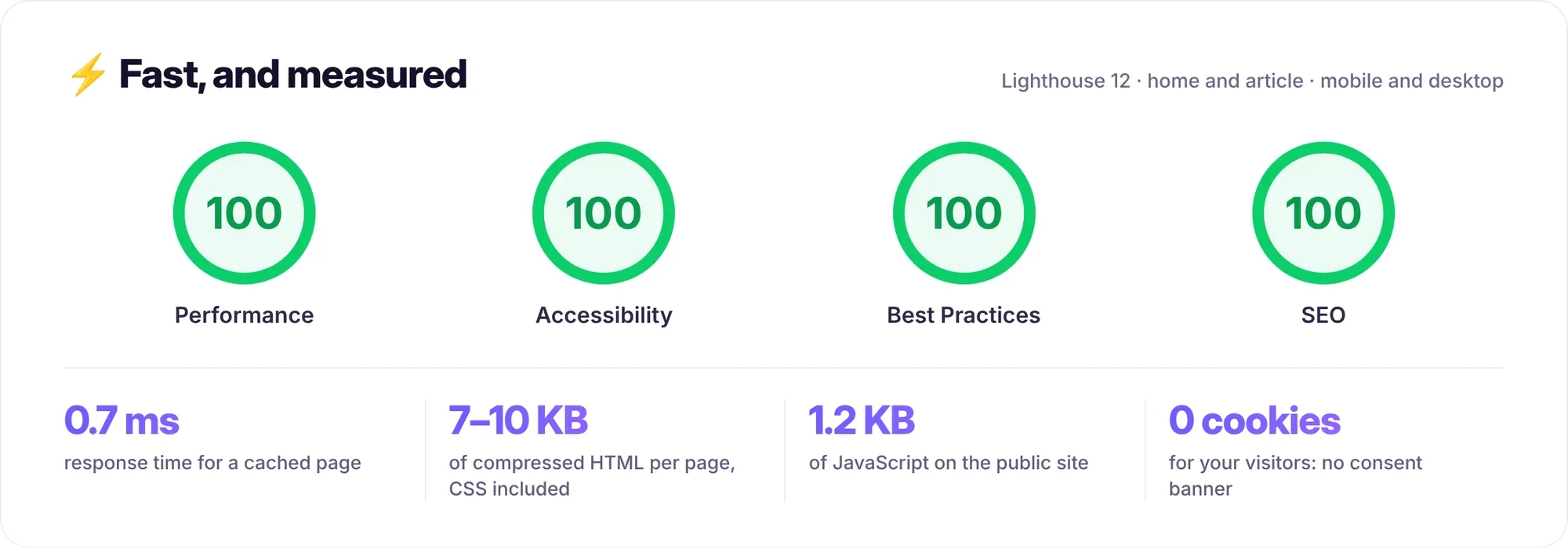
Speed. Éclair generates each page only once, then serves it from a static cache, directly through index.php, without loading the application or reading any content. Measured locally, the server response time drops to 0.7 ms, and the demo site scores 100/100 on Lighthouse.
Security. Without a database, SQL injection disappears, since there’s no database to attack. And the main risk with traditional CMSs actually comes from plugins: according to Patchstack’s report, 91% of the 11,334 WordPress vulnerabilities discovered in 2025 affected plugins (source, as of October 30, 2026). Éclair has none to update.
Backups. Your whole site fits in two folders: data/ (content, settings, accounts) and media/ (images). One click on Security › Download a backup is all it takes, or a simple copy via FTP.
Moving. No SQL export and no search-and-replace of URLs: you copy the folder, then change the address in Settings › General. Internal links adapt on their own.
Hosting. An entry-level shared hosting plan with PHP 8.1 or later is enough, with no MySQL database to create or monitor. For comparison, WordPress recommends PHP 8.3 and MySQL 8.0 or MariaDB 10.11 (official requirements, as of October 30, 2026).
Database or files: what are the day-to-day differences?
| Criterion | CMS with a database (e.g., WordPress) | Flat-file CMS (e.g., Éclair) |
|---|---|---|
| Content storage | MySQL or MariaDB tables | Protected files |
| Installation | Create a database, then run the wizard | Upload a folder, answer 4 questions |
| Backups | Files + database export | Copy 2 folders |
| Moving | Export, import, replace URLs | Copy the folder |
| SQL injection | A risk to monitor | Impossible |
| Large volumes (tens of thousands of pages) | Well suited | Poorly suited |
| Complex queries, filters, catalog | Well suited | Out of scope |
What are the limitations of this model?
A flat-file CMS isn’t the right answer to everything. Be clear-eyed about these points before you choose:
- very large sites: with tens of thousands of content items, a database sorts and filters far more efficiently than files
- online sales: a cart, inventory, orders and payments call for a dedicated tool, and Éclair doesn’t offer one
- highly structured data: directories, catalogs with filters, member areas or bookings are out of scope
- internal search: Éclair’s is simple and weighted (title, then summary, then text), with no advanced filters
- the ecosystem: there’s no library of thousands of plugins. It’s a deliberate choice, but you should know it if you’re counting on a specific plugin.
Who is this type of CMS made for?
For any “human-scale” site that needs to be fast, well-ranked and hassle-free:
- self-employed professionals, consultants and freelancers
- craftspeople, local shops, and small and medium-sized businesses
- nonprofits and local governments that are short on time for maintenance
- blogs, portfolios and sales pages
- developers who want readable code: Éclair is written in PHP 8.1, with no framework and no Composer
Is Éclair the only flat-file CMS?
No. Other flat-file CMSs exist, such as Grav (free and open source) or Kirby (paid license), and static site generators like Hugo play in a neighboring, more technical category. Éclair stands out for what it includes without plugins: SEO, GEO for AI answer engines, security, an optional AI assistant and a guided installation in 4 questions, designed for people who aren’t developers.
To go further, explore all of Éclair’s features or read our honest comparison of Éclair and WordPress.
How can you try Éclair?
The simplest way is to try it: the Éclair archive weighs 402 KB and installs in 3 minutes. Follow the step-by-step installation guide on your hosting, or test Éclair on your computer first, without putting anything online.
Frequently asked questions about flat-file CMSs
Is a CMS without a database less secure?
No, quite the opposite: without a database, SQL injection is impossible. In Éclair, data files are doubly protected (an .htaccess rule and a <?php exit; ?> line), private and written atomically.
What happens if a file gets damaged?
Atomic writes prevent half-written files, each piece of content keeps its last 20 versions, and the index rebuilds itself from the files. Regular backups are still the best insurance.
How many pages can Éclair handle?
There’s no fixed limit, but Éclair is designed for business websites, blogs and portfolios, not for catalogs with tens of thousands of product pages.
Can you switch from WordPress to a flat-file CMS?
Yes, for a business website or a blog: you need to recreate the pages and either keep the URLs or redirect them. The method is detailed in our guide to migrating from WordPress to Éclair.
Read next
Migrate from WordPress to Éclair: the step-by-step method
Migrate from WordPress to Éclair without losing your rankings: URL inventory, recreating pages, 301 redirects and the switchover, step by step.

GEO: how to get your site cited by ChatGPT, Perplexity and Gemini
GEO helps your site get cited by ChatGPT, Perplexity and Gemini: clear writing, structured data, llms.txt and AI bot rules. The complete method.
Éclair 1.2.0: the AI assistant writes, you publish
Éclair 1.2.0 adds an AI assistant (Claude or ChatGPT, with your own key): drafts, images and edits in your site’s voice, never published without you.