Security
Why Éclair is a secure PHP CMS by default: no database, Argon2id, two-factor authentication, a strict CSP, integrity checks and an offensive security review.
Contents
Éclair is a secure PHP CMS by default, designed for a hostile environment: shared hosting and bots that try passwords around the clock. You have nothing to install or configure to be protected. This guide explains what’s locked down out of the box, what the admin monitors and the four steps that make your site even stronger.
Why is a site without a database safer?
Without a database, SQL injection, one of the most widespread attacks on websites, simply has nothing to target. Your content lives in files, and those files are protected twice:
- the
data/,app/andcache/folders are blocked from the web by the.htaccessfile - every data file starts with the line
<?php exit; ?>: even if a server ignored.htaccessfiles, nothing would be displayed, and no<?phpsequence can ever be written into it - the files are private (0600 permissions) and written atomically: an interruption never leaves a half-written file
The installation itself is protected: it’s only possible within 2 hours of the first visit, and the site address is only used to redirect visitors once the server itself has verified it.
How is login protected?
- Passwords hashed with Argon2id (19 MiB of memory, 2 passes), the parameters recommended by OWASP, with bcrypt as a fallback. 10 characters minimum, common passwords refused.
- Brute-force protection: each attempt is reserved before it’s checked, which makes it impossible to exceed the limit with parallel requests. The limits apply to the network (IPv4 address or /64 block in IPv6) and to the targeted account. Your usual device is never locked out by an attacker who fails on purpose.
- Two-factor authentication (2FA) that works with Google Authenticator, Microsoft Authenticator, 1Password or Bitwarden, with a QR code and 8 backup codes shown only once. After 10 wrong codes, the account’s 2FA is locked for 15 minutes and its owner is notified by email.
- Password re-prompt for sensitive actions (backups, accounts, advanced settings, email change) more than 15 minutes after logging in.
- Hardened sessions: no session before login,
HttpOnly,SecureandSameSite=Strictcookies, logout after inactivity, a Log everyone out button. The admin is forced onto HTTPS as soon as the site uses it. - CSRF tokens on every action, and checks on the origin of requests.
How is the public site locked down?
| Protection | What it prevents |
|---|---|
| Strict Content-Security-Policy (no inline scripts, SHA-256 hash for the style) | Injected scripts from running |
Anti-clickjacking, nosniff, Referrer-Policy, Permissions-Policy, optional HSTS | Booby-trapped embedding, information leaks |
| No open redirects | Your domain being used to redirect to a malicious site |
| Content sanitized with an allowlist | javascript: or data: links, even disguised |
| Contact form with a honeypot field, a token and limits | Spam, without a captcha: 5 messages per network every 10 minutes, 100 per day for the whole site |
| Images re-encoded on upload | Hidden payloads and EXIF or GPS data; SVGs and images containing code are refused |
Security headers depend on the settings, never on the request: a page served from the cache sends the same headers to everyone, which makes cache poisoning impossible.
What does the Security page monitor?
Available to administrators only, the Security page brings your monitoring tools together:
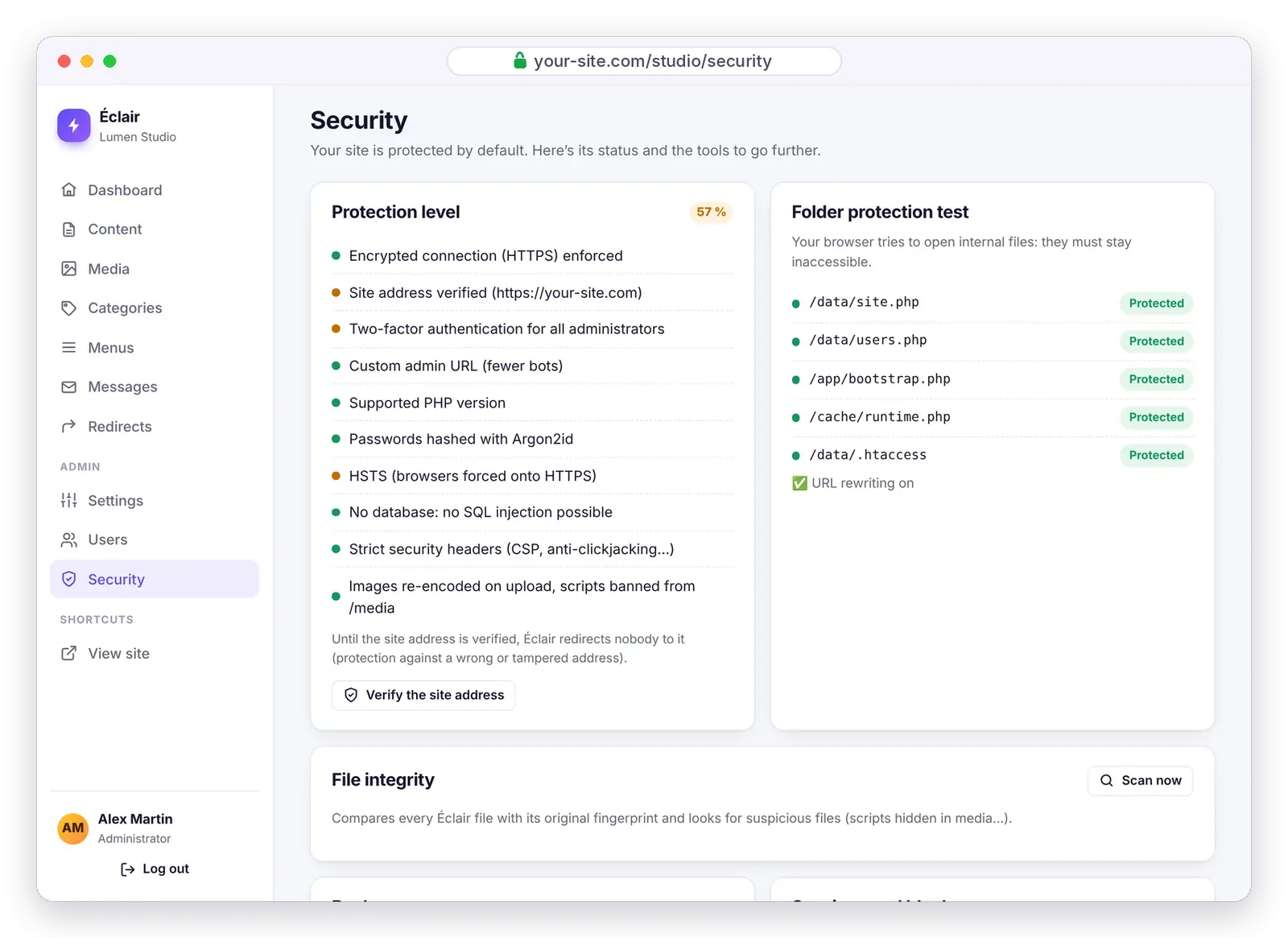
- Protection level: a percentage and the status of each protection (HTTPS, verified address, two-factor authentication, admin URL, PHP version, HSTS…), with the Verify the site address button.
- Folder protection test: your browser tries to open internal files, which must stay inaccessible.
- File integrity: every Éclair file is compared with its original fingerprint, and suspicious files are flagged, such as a script hidden in the media folder or a
.phpfile without the protection line indata/. - Backup: an archive of your whole site in one click.
- Sessions and blocks, then the Security log: logins, failures, lockouts, password changes, backups.
The logs are capped at 1 MB: there’s no way to inflate them to fill up the disk.
What did the offensive security review reveal?
Before its release, Éclair was methodically attacked: race conditions, brute force, redirects, injections, booby-trapped files. 17 vulnerabilities were found (2 high, 7 medium and 8 low), and all of them were fixed. The 13 attack scenarios were then replayed against the fixed version: all neutralized. The AI assistant, which arrived with version 1.2.0, had its own review before its release.
Éclair’s automated tests, which run 299 checks, replay a large part of these attacks. The details of the fixes are in the changelog.
Which steps make your secure PHP CMS even stronger?
Also keep PHP up to date at your host: Éclair runs on PHP 8.1 to 8.5, and 8.3 is recommended. For backups and updates, see the Updating, backing up, moving guide.
Questions about security
Is Éclair really a secure PHP CMS without a security plugin?
Yes. Two-factor authentication, brute-force protection, strict headers, integrity checks and backups are built in. With no plugins to update, the number one source of vulnerabilities in classic CMSs disappears. The comparison with WordPress puts numbers on that gap.
I lost my two-factor authentication phone. What should I do?
Use one of your 8 backup codes. If you’ve lost them too and no other administrator can help, follow the FTP recovery procedure described in Troubleshooting.
Can an attacker lock my account by failing on purpose?
No: your usual device is never locked out by someone else’s failed attempts. The limits target the attacker’s network and the account, without stopping you from logging in from home.
What should I do if the integrity check flags a modified file?
If you haven’t customized anything, replace the file with the one from the official archive. If you’ve modified your theme, that’s expected: the files in app/theme show up as modified.